Every AI system needs gates, and every gate needs a review date
TL;DR
A gate is a check that a piece of AI work has to pass before it moves to the next step. Gates are how you get consistent work, because the check runs every time and nothing gets skipped on a busy day. They also carry a cost: a gate can stop something that would have worked. As the models get smarter, some of your gates turn into limits, so every gate needs a review date.
What is a gate in an AI system?
A gate is a checkpoint with a pass mark. Work arrives, the gate tests it against a short list, and the work either moves on or goes back.
You already run gates in your business without calling them that. A second pair of eyes on a quote before it goes out. A manager signing off a refund over a set amount. A proofread before the brochure goes to print. With AI, the checker can be an agent too, and it runs the same check every time, including on a Friday afternoon.
The rule is simple. If the work does not pass, it does not move.
What do gates look like in a working system?
Here is ours, as one example. In AIOS, every piece of work travels the same road, and there are three gates on it.
- Gate 1, privacy and routing. Before any work starts, the task is scanned for personal and sensitive data. Anything carrying personal data is handled on a local model, so it stays on the machine.
- Gate 2, guardrails. After the work is done, the output is scanned for leaked personal data, legal risk, harmful content and claims the business cannot back up.
- Gate 3, quality. The work is scored on brand voice, accuracy, completeness and usefulness. Each has a pass mark. Anything under the mark goes back with notes.
After the third gate the work waits as a draft, and anything leaving the business needs a person to approve it first.
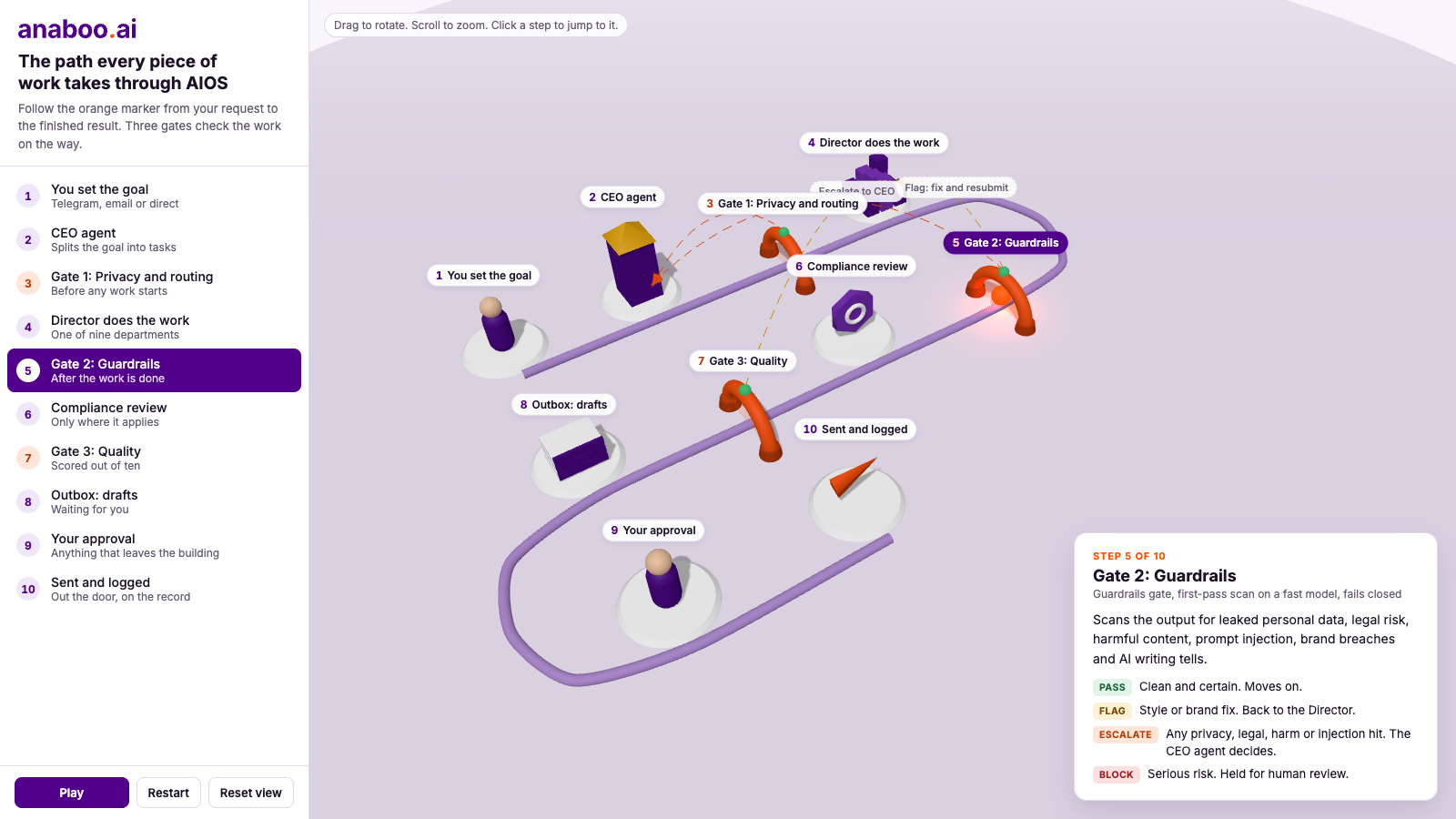
Open the interactive 3D version and follow one piece of work from the request to the finished result. You can rotate it, zoom in, and click any stop to see what happens there.
That is an example of the gates you might have. Copy the shape and expect your own list to look different.
Should your gates be the same as ours?
No. The right gates depend on the work.
If the work is programming, you might have:
- A privacy gate. Is personal data handled the way it should be?
- A row-level security gate. Can each user see only their own records, and nobody else's?
- A hacker gate. If someone set out to break in, where would they get through?
- An exposed passwords gate. Has a password or key been left sitting in the code?
If the work is marketing, the list changes completely:
- Headline. Does it earn the next line?
- Hook. Is there a reason to keep reading?
- Clear intent. Is it obvious what the page is for?
- Call to action above the fold. Can the reader act without scrolling?
You could write a list like this for finance, for customer replies, for hiring. Each one will be different, and it should be. A gate that makes sense for code is useless on a landing page.
See where AI fits in your business. Free.
A 60-minute audit. We map the highest-value automations and what they're worth in time and money. No pitch, no pressure.
What do gates give you?
Consistency.
Most mistakes in repeat work come from the step somebody skipped. The person knew to check for the client's name in the wrong place, or the price that changed last month. They were busy, and they did not check. A gate takes that out of people's hands. The check runs every time, on every piece of work, whether the day is quiet or on fire.
A gate means the work has to pass. Nobody has to remember.
For any work you do again and again, that is most of the battle.
What do gates cost you?
A gate can stop something that would have worked.
Every gate is a decision you made in advance, about work you had not seen yet. Most of the time that decision is right. Sometimes it is wrong, and the gate cannot tell the difference.
Take the marketing list above. A rule that the call to action always sits above the fold is sound for most pages. It will also turn back the long page that tells a customer's story first and earns its ask further down, even when that page would have sold better. The gate did its job. You lost the better page.
The more gates you add, the more often this happens. Each one closes off a few mistakes and a few good ideas with them.
Why does every gate need a review date?
Because the models keep getting more capable, and your gates do not update themselves.
A lot of gates get written to hold a weaker model in line. It rambled, so you forced a rigid template. It guessed, so you made it show every step. Then a more capable model arrives, one that writes well when given room and checks its own work, and the old gate is still there, holding it to the standard of the tool you used before.
At that point the gate has stopped protecting you. It is limiting what the system can do, and nobody notices, because a gate that blocks good work looks exactly like a gate that is working.
Some gates stay however good the models get. Privacy. Security. Anything you cannot undo. A person approving what leaves the business. Those guard against mistakes that are expensive whoever makes them. The gates to question are the ones about taste, format and method.
How do you review a gate?
Ask three questions of each one.
- What was it written to catch? If nobody can say, that tells you something.
- When did it last catch something real? A gate that has caught nothing in months may have done its job, or the problem may have gone away.
- What good work has it turned back? Look at what was rejected, and ask whether you would have been happy to send it.
If a gate is still catching real problems, keep it and move on. If it has caught nothing for months and keeps returning work you would have sent, loosen it or remove it. Do the review on a set rhythm, and again whenever you move to a more capable model.
What to do this week
- Pick the one type of work AI does for you most often, and write down the three or four checks it must pass before it leaves.
- Split that list in two: the checks that guard data, security and decisions you cannot undo, and the checks that are about style, format and method.
- Build the checks into the process, so they run every time and do not depend on anyone remembering.
- Put a review date on the second list. Once a quarter is a sensible start.
- At the first review, remove one gate that has not earned its place, and watch what the work does without it.
Where to from here
Book a free AI audit and we'll show you what's worth augmenting first in your business, and what isn't.
Live with passion & AI,
Brett
Want this installed in your business?
Bespoke AI implementation across your operations: strategy, build, rollout, and ongoing drift maintenance.
Frequently asked questions
What is a gate in an AI workflow?
+
A gate is a check that a piece of work must pass before it moves to the next step. The work is tested against a short list, and it either moves on or goes back for a fix.
How many gates should a business have?
+
As few as cover the mistakes you cannot afford. Three or four checks for each type of work is plenty to start with. Add one only when a real problem gets through.
Do gates slow the work down?
+
A little. An automated check adds very little time to each piece of work. The slowdown that matters is a gate that keeps sending good work back, which is why gates need reviewing.
Which gates should never be removed?
+
The ones that guard personal data, security and decisions you cannot undo, plus a person approving anything that leaves the business. Those mistakes are expensive however capable the model is.
How often should gates be reviewed?
+
On a set rhythm, with once a quarter as a sensible start, and again whenever you move to a more capable model. Ask what each gate was written to catch, when it last caught something real, and what good work it has turned back.
Can an AI agent run a gate, or does it need a person?
+
An agent can run the first pass, and it will run it the same way every time. Keep a person on the calls that carry legal, financial or reputational weight, and have the agent hand anything doubtful up instead of deciding it alone.

Brett is a four-time founder (Darra Tyres, Gladfish, EzyTrac, Anaboo) and the operator behind AIOS, Anaboo's AI Operating System. He writes from inside the build, installing AI in his own businesses first and reporting back what actually moves the numbers. Based between Singapore, the UK and Australia.